Game Assets

Art, Sound, Models, and the Pipeline That Puts Them in Your Game

GD 2000 — Game Design

2026-11-04

The Part of the Game You Can See

The loop deck ended on feedback — what the game shows, sounds, and feels back. Almost all of that feedback is assets.

Assets do three jobs, and they are not the same job:

  • Legibility — what just happened? A hit flash, a health bar, a tile edge.
  • Tone — what kind of game is this? Palette, music, font.
  • Juice — did that feel good? The sound, the squash, the particle.

A game with placeholder art can be legible, tonally clear, and juicy. A game with beautiful art can be none of those. Assets are not decoration — they are the interface.

The Asset Families

Family What it includes Job in the game Typical format
2D art sprites, sheets, tilesets, backgrounds the visible world PNG
3D art meshes, materials, texture maps, props the visible world, with depth glTF / GLB, FBX
Animation sprite frames, skeletal clips, blends motion and feedback PNG sheets, GLB clips
Audio SFX, ambience, music, voice feedback and tone OGG, WAV, MP3
Text fonts, dialogue, localization legibility and voice TTF/OTF, JSON, CSV
Data levels, tilemaps, atlases, configs structure and content JSON, YAML, TMX
Shaders + video effects, cutscenes, menus look and spectacle GLSL/WGSL, WebM

The families have different pipelines, but the same questions: where does it come from, what does it cost, and can you replace it?

2D: Sprites and Sheets

  • A sprite is one image drawn as one thing.
  • A sheet packs many frames into one image: one file, one download, one texture.
  • The frames are just rectangles. The sheet does not say where they are — the layout does.
  • This one is 508×288: eleven 72×97 walk frames plus stand, jump, duck, and hurt — and they are not in a tidy grid.
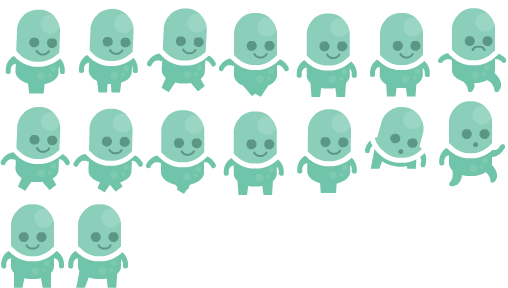
“Platformer Art Complete Pack” by Kenney (kenney.nl), CC0 — via OpenGameArt

2D: Grids and Atlases

A sheet is just an image; the layout is the contract.

Grid sheet Atlas
Frame rects computed from a cell size listed explicitly
Ships with nothing extra a sidecar file
Example the tileset: 70×70 cells, 2 px margin the player sheet: a .txt of rects

Kenney ships a text sidecar, one line per frame:

p1_walk01 = 0 0 72 97
p1_walk02 = 73 0 72 97
p1_walk03 = 146 0 72 97

Sidecar formats vary: TexturePacker ships JSON, Starling ships XML, Tiled ships TMX. Encodings vary too — this pack’s JSON is UTF-16, so JSON.parse chokes on the BOM until you strip it.

2D: Tilesets and Tilemaps

  • A tileset is a palette of terrain tiles. A tilemap is the painting: which tile goes where.
  • 500 copies of a tile is one image and 500 small draws — not 500 files.
  • The tileset’s grid is a contract: tile size, margin, spacing. Get it wrong and the level shifts by two pixels.
  • This one is 70×70 tiles with a 2-pixel margin, 12 columns by 13 rows. Measure it once, then write it down.
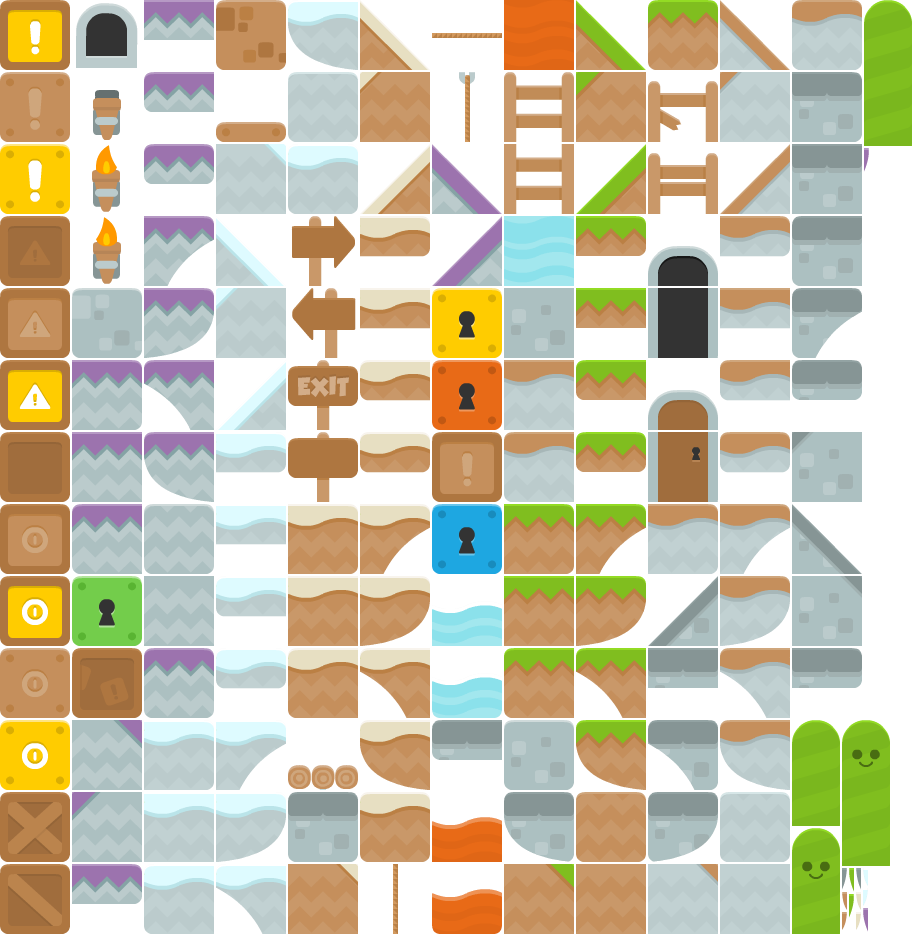
“Platformer Art Complete Pack” by Kenney, CC0 — a clean grid: 70×70 tiles, 2 px margins

Autotiling — choosing the right edge and corner tile from its neighbours — is your job. The engine gives you a tile grid, not a terrain solver.

3D: Models and Materials

  • A model is not one file: mesh, UVs, normals, materials, and texture maps.
  • The modern default is PBR: albedo, roughness/metallic, normal, AO, emissive.
  • glTF/GLB is the web format; FBX is the DCC interchange; OBJ is geometry only.
  • Kits are the 3D tileset: modular walls, floors, and props you snap together.
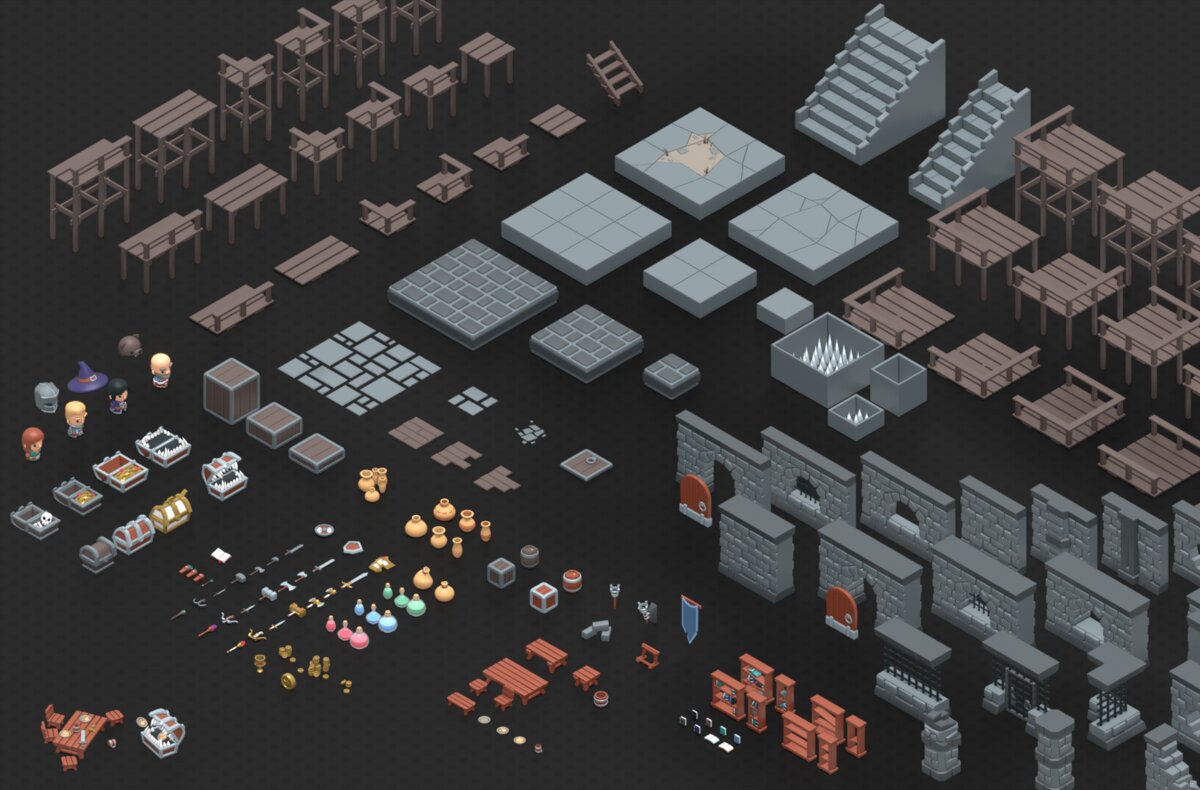
“KayKit: Dungeon Pack 1.0” by Kay Lousberg, CC0 — a modular kit, not a level

Scale and units are a contract. glTF is metres, Y-up; FBX is often centimetres, Z-up. Import at the wrong scale and your hero is 100× too big — or too small to see.

The 3D pipeline: model → UV → texture → rig → animate → export → import. Every handoff is a file, and every handoff can lose something.

3D: Rigs, Clips, and LODs

  • Rig — a skeleton plus skin weights; the mesh deforms with the bones.
  • Clip — a named animation (idle, run, jump); a state machine picks one and blends between them.
  • Root motion — does the clip move the character, or does your code?
  • Retargeting — reuse one humanoid rig across many characters.
  • LODs — swap to a lower-poly mesh at distance; culling and batching matter as much as triangle count.

Cost multiplies: characters × clips × blends × LODs. A 3D game with ten characters and forty clips is a different production problem from a 2D game with one sprite sheet.

Texture memory is the quiet budget. A 2048×2048 RGBA texture is ~16 MB uncompressed; mipmaps add about a third. Ten of them is a phone-sized problem.

Our engine is 2D: a 3D model has to become a sprite sheet (pre-rendered) or move to a 3D renderer. Decide which before you fall in love with a model.

Audio: Five Jobs

Role Length Count Job
SFX 50 ms – 2 s dozens feedback: the hit, the jump, the pickup
UI 20 – 200 ms a handful confirmation: the click, the hover
Ambience 10 s – 2 min loop one per area place: wind, crowd, dripping water
Music 1 – 4 min loop one per scene tone and pacing
Voice 1 – 30 s story-dependent character and story
  • Layer sounds: a footstep is a footstep plus a surface.
  • Vary them: randomise pitch and volume slightly, or the tenth repetition becomes an irritation.
  • Duck the music under dialogue and loud SFX.
  • Spatialise in 3D: position, attenuation, occlusion.

Audio: Formats, Loops, and Loudness

  • WAV — uncompressed; for editing and short SFX.
  • OGG Vorbis — small and open; the default for music on desktop and web.
  • MP3 — universal fallback; gapless looping is unreliable.
  • Opus / AAC — modern and efficient; check platform support.

Memory is the real constraint. 44.1 kHz stereo 16-bit is about 176 KB per second — roughly 10 MB per minute. Stream music; preload SFX.

  • Loops need seamless points and no clicks. Compose a tail; check the join on headphones.
  • Loudness: normalise to a target (around −16 LUFS integrated, true peak below −1 dBTP), then mix music under SFX.
  • Middleware (FMOD, Wwise) exists for adaptive music, randomisation, and occlusion. You do not need it yet.
  • The audio pipeline: source → edit → normalise → loop → compress → import.

Data, and Everything Else

Not all assets are pictures or sound. The rest are files the game reads:

  • Levels — Tiled TMX/JSON, custom text maps, prefabs.
  • Atlases — TexturePacker JSON, Starling XML.
  • Dialogue — Ink, Yarn, plain JSON.
  • Localization — CSV or JSON, one row per string.
  • Fonts — TTF/OTF, or a bitmap sheet for pixel art.
  • Shaders — GLSL/WGSL; code that ships as an asset.
  • Video — WebM/MP4, usually menus and cutscenes.

Data is content, so it needs the same discipline as art: a schema, a validator, and a version. A level that crashes the game is a bad asset, not a bad player.

The Pipeline

1 · Find
search, tags, license filter

2 · License
credit? share-alike?

3 · Inspect
open the zip, measure the grid

4 · Organize
source vs runtime, credits

5 · Import
load once, at startup

6 · Configure
anchor, scale, filtering

7 · Integrate
animate, tile, mix

8 · Playtest
does it read? does it fit?

Playtest sends you back to Find. A pipeline is a loop — and this is a loop deck.

Every step has a failure mode: the wrong license, a missing file, the wrong grid, the wrong path, the wrong scale.

The pipeline’s real job is to make an asset cheap to replace. If swapping a sprite is a two-minute change, you can iterate on art. If it is a two-hour change, the art freezes — and so does the design.

Where Assets Come From

Source Good for Watch out for
OpenGameArt 2D, 3D, and audio; mixed licenses quality varies; check each submission
Kenney coherent CC0 packs; prototyping a recognisable house style
itch.io packs cheap, stylish indie art per-pack licenses; often paid
Sketchfab, Poly Pizza, Quaternius 3D models and kits CC terms vary; attribution
freesound SFX and ambience quality varies; license per file
Commission or make it fits your game exactly costs money or time

AI-generated assets are fast placeholders, but provenance and licensing are unsettled. Check the tool’s terms and the course policy before shipping one.

Free does not mean coherent. The cheapest path to a good-looking game is usually one pack that fits, not five that do not.

Licenses

License Credit? Share-alike? What it means for your game
CC0 no no Do anything. Credit as a courtesy.
CC-BY 3.0 / 4.0 yes no Credit, link, and say what you changed.
CC-BY-SA 3.0 / 4.0 yes yes Your changes to the art stay CC-BY-SA.
OGA-BY 3.0 / 4.0 yes no CC-BY without the anti-DRM clause.
GPL 2.0 / 3.0 yes yes Avoid unless the whole project is GPL.
  • More than one license listed? Pick one and follow it.
  • “Royalty-free” is a price model, not a license — read the EULA.
  • Public domain is CC0 in effect. All rights reserved means you may not use it, even though you can download it.

CC0 is the easy button. CC-BY is the normal case. CC-BY-SA and GPL are the ones that can bite.

Provenance: Keep the Receipt

For every asset, record five things: title, author, license, URL, and what you changed.

On an OpenGameArt page, that is:

Field What you take from it
Author the name in your credits
License(s) what you may do; multiple means choose one
Copyright / Attribution Notice the artist’s exact credit instructions
Files what you actually get — the preview is not always in the zip

Save the page — as a PDF, a screenshot, or an archived link. Pages disappear and packs get re-uploaded. Write the credit line when you download, not at the end of the project.

Open the Box

Platformer Art Complete Pack/
  license.txt                      <- the license, in the pack
  Base pack/
    preview.png
    Player/
      p1_spritesheet.png           <- the sheet
      p1_spritesheet.txt           <- the frame rects
      p1_walk/p1_walk.json         <- an atlas (UTF-16)
      p1_walk/PNG/p1_walk01.png    <- individual frames
      Vector/characters.svg        <- source art
    Tiles/tiles_spritesheet.png
  Extra animations and enemies/
  ...
  Thumbs.db                        <- junk; don't commit it

Ask of every pack: does the preview match the files? What is the frame size? Is there alpha? What is the tile size? Is there a README or license file? What is junk?

Organize

assets/source/            <- masters; never served
  character.blend  ui.psd  jump.wav
public/assets/            <- runtime; served at /assets/
  sprites/  player.png  enemy.png
  tiles/    platformer.png
  models/   dungeon.glb
  audio/    jump.ogg  theme.ogg
  ui/       heart.png
CREDITS.md
  • Keep source and runtime separate. You author a .blend; you ship a .glb. You edit a .wav; you ship an .ogg.
  • With Vite, public/ is served at the site root: public/assets/x.png becomes assets/x.png in your code.
  • Name by role, not by source: player-run.png, not p1_spritesheet (1).png.
  • Big binaries go in Git LFS — or out of the repo entirely. Never commit 200 MB of source art.

The test: a teammate should be able to guess where a file lives, and find the license, without asking you.

Formats, Sizes, and Budgets

The asset you author is not the asset you ship.

Asset Authored as Shipped as Cost at runtime
Sprite PSD, Aseprite PNG, atlas 4 bytes/pixel in VRAM
Texture PSD, 4K PNG/KTX2, 1K 1024² ≈ 4 MB; 2048² ≈ 16 MB
Model .blend, .ma GLB + Draco triangles, draw calls
Audio WAV, 48 kHz OGG ~10 MB per stereo minute
Level editor scene JSON/TMX parse time, memory
  • Load time is a design constraint. A 100 MB first load loses players before the menu.
  • Compress for the platform: atlas + KTX2 for textures, OGG for audio, Draco or meshopt for meshes.
  • Budget in megabytes and milliseconds, not in “looks fine on my machine”.

Art Direction and Consistency

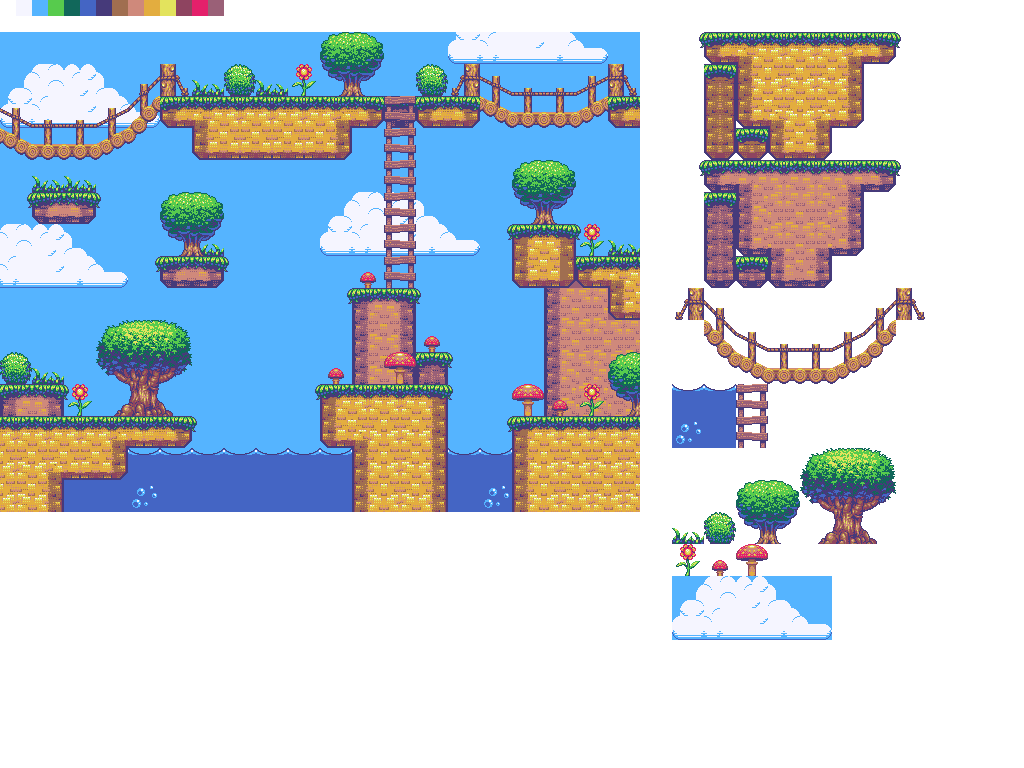
Kenney, CC0 — flat vector, thick uniform outlines

“Generic Platformer Tiles” by surt, CC0 — pixel art, limited palette
  • Mixing packs mixes palettes, outline weights, resolutions, perspectives, and frame counts.
  • Players cannot say why it looks wrong. They just say it looks wrong.
  • Pick a pack whose style matches the tone you want. The pack is the art direction.
  • If you must mix: same resolution, same perspective, then unify with a palette or a tint.

Consistency beats quality. A coherent simple style reads better than a mismatched fancy one — in 2D and in 3D.

Scope: What a Game Actually Needs

Family Minimum for a small game Multiplies when you add
2D art player, one enemy, tileset, background enemies, biomes, effects
3D art one character, one kit, props rigs, LODs, lighting
Animation idle, move, hit, die blending, retargeting, cinematics
Audio four SFX, one loop ambience, voice, adaptive music
UI / text health, menu, font localization, accessibility
Data one level format editors, tools, live content

That table is a complete small game’s worth of assets — and roughly one afternoon of integration if the pipeline is clean, or a week of fighting if it is not.

Placeholders First

  • Build the loop with rectangles or a greybox. Swap in art when the mechanics work.
  • Art freezes code: once the sprite is in, nobody wants to change the jump height.
  • Placeholder art is honest — it shows whether the game is fun without the decoration.
  • The pipeline exists to make the swap cheap. That is the whole reason to organise, load, and slice carefully.

Better art will not save a bad loop. A good loop survives placeholder art.

This is the order the lab expects: game first, assets second, polish third.

Credits and Ethics

OGA’s recommended credit line:

“Asset Name” by Author, licensed CC-BY 3.0: https://opengameart.org/content/…

  • Put it in CREDITS.md and on a credits screen. The license is a promise you keep in the build.
  • CC-BY: say what you changed — cropped, recoloured, resized.
  • CC-BY-SA: your changes to the art stay CC-BY-SA. It applies to the art, not to your TypeScript — but if that sentence made you nervous, use CC0 or CC-BY.
  • Don’t scrape commercial art, don’t use “found” sprites, don’t strip the license file.

The artist is a person. A credit and a thank-you cost nothing — and the open-asset ecosystem runs on visible credit.

From Pack to Playable

const sheetImage = new ex.ImageSource('assets/sprites/player.png');
const loader = new ex.Loader([sheetImage]);

const game = new ex.Engine({ width: 960, height: 540, pixelArt: true });

game.start(loader).then(() => {
  const sheet = ex.SpriteSheet.fromImageSource({
    image: sheetImage,
    grid: { rows: 4, columns: 4, spriteWidth: 32, spriteHeight: 32 },
  });

  const run = ex.Animation.fromSpriteSheet(
    sheet, [0, 1, 2, 3], 100, ex.AnimationStrategy.Loop
  );

  player.graphics.use(run, { anchor: ex.vec(0.5, 1) });
});

The loader is a gate: nothing draws until every resource resolves. getSprite(x, y) is (column, row), while Animation.fromSpriteSheet takes row-major indices — mixing them up is the classic bug.

Irregular atlas? Build the frames yourself: new ex.Animation({ frames: sprites.map(g => ({ graphic: g })), frameDuration: 100 }).

Tiles and Sound

const tiles = ex.SpriteSheet.fromImageSource({
  image: tilesImage,
  grid: {
    rows: 13, columns: 12,
    spriteWidth: 70, spriteHeight: 70,
  },
  spacing: { margin: { x: 2, y: 2 } },
});
const map = new ex.TileMap({
  tileWidth: 70, tileHeight: 70,
  rows: 15, columns: 40,
});
for (let y = 0; y < level.length; y++) {
  for (let x = 0; x < level[y].length; x++) {
    const i = level[y][x];
    const tile = map.getTile(x, y);
    if (!tile || i === 0) continue;
    const col = i % 12;
    const row = Math.floor(i / 12);
    tile.addGraphic(tiles.getSprite(col, row));
    tile.solid = SOLIDS.has(i);
  }
}
scene.add(map);
const jump = new ex.Sound(
  'assets/audio/jump.ogg',
  'assets/audio/jump.wav'
);
jump.volume = 0.6;
jump.play();
  • The level is data; the tileset is art.
  • i → (col, row) is % and Math.floor.
  • Audio needs a user gesture.
  • One Sound per clip; don’t await play() in the update loop.

The Lab

Do this

  1. Pick one OGA pack — CC0 or CC-BY.
  2. Download, inspect, and copy what you need into public/assets/.
  3. Load it with ex.Loader; replace the placeholder player with an animated sprite.
  4. Build the level from a tileset with ex.TileMap.
  5. Add at least two SFX and one music loop.
  6. Write CREDITS.md with the exact license lines.

Done means

  • no 404s in the console
  • the player animates and faces the right way
  • the level is tiled, and solid tiles collide
  • sound plays after a click
  • the credits match the licenses
  • pnpm dev and pnpm build both work

Common failures: wrong grid → sliced sprites · wrong path → invisible actor · wrong anchor → floating player · no gesture → silence · missing credit → an academic honesty problem, not a style note.

Recap

  • An asset is a file with a license and a shape — 2D, 3D, audio, text, or data.
  • The pipeline: find → license → inspect → organise → import → configure → integrate → playtest.
  • Sheets need a grid or an atlas; tilesets need a tilemap; audio needs a gesture; models need units and rigs.
  • Consistency beats quality. Placeholders beat paralysis. Credits are part of the build.
  • Next: the lab. Bring a pack and a plan.

Exercise: before the lab, write the credit line for the pack you intend to use — name, author, license, URL. If you cannot write it, you have not finished choosing.