GPUs and the Throughput Machine

Where the accelerator sits, and whose memory it is

CS 4250 — Computer Architecture

2026-10-28

Roadmap

Three lectures. The first is the idea, the second is the machine, the third is the card and the model.

Lecture 1 — why a throughput machine at all

  1. Latency vs throughput — the bet, and the one equation that prices it
  2. SIMT — how 64 lanes share a single program counter
  3. Four attempts — and the machines that tried this first

Lecture 2 — how a GPU is built

  1. Memory, inverted — the hierarchy with the register file on top
  2. The machine — from one compute unit to a whole card

Lecture 3 — how a GPU is attached and programmed

  1. PCI and PCIe — why a GPU is a card and not a die
  2. Programming — what the rewrite actually costs
  3. Synthesis

Part 0 — Framing

Where We Left Off

Last week: Moore’s Law held, then clocks stopped.

1971 2004 2022
Transistors 2.2 K 125 M 20 B
Clock 740 kHz 3 GHz 3 GHz

Clock speed has been pinned near 3 GHz since about 2005, because doubling frequency quadruples power and a laptop CPU has a 10 W budget.

So there were three ways to spend the transistors, and we walked all three:

  1. Spend it on single-thread speed — caches, deeper speculation, wide dividers.
  2. Copy and paste the core — multicore, then multi-socket, then NUMA.
  3. Add specialised instructions — vector units, crypto, video decode.

There is a fourth, and it is the subject of the next three lectures:

Stop trying to make one instruction stream finish sooner. Build a machine that runs thousands of them at once, and issues from whichever can make progress.

Two Ways to Spend a Transistor

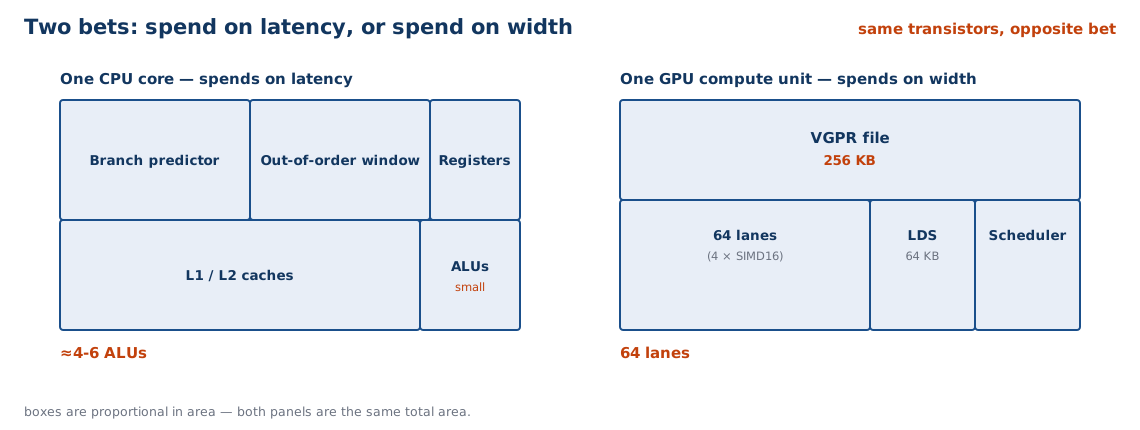
A CPU core and a GPU compute unit are made of the same stuff and spend it oppositely.

CPU core GPU compute unit
Area goes to not stalling having something else to run
Mechanisms OoO window, branch predictor, L1/L2, prefetch 64 lanes, 256 KB register file, LDS, 4 schedulers
Latency hidden by prediction concurrency
Breaks when working set outgrows the cache work diverges, or accesses are uncoalesced
Programmer sees one instruction stream 64 threads per instruction

Same transistors. Opposite bet. Almost every difference in this deck follows from that one sentence.

Every Boundary Is a Fabric

A machine is not one thing. It is a set of pools of storage and compute, and every boundary between two pools has a width.

Boundary Width Where
Register file → lanes 64 × 4 B per cycle every CU
Shared memory → lanes ~128 B per cycle every CU
L2 → CU ~5 TB/s aggregate MI50
HBM2 → L2 1,024 GB/s MI50
Memory controller → CPU ~140 GB/s measured vampire
Host → GPU 31.5 GB/s PCIe 4.0 x16, kraken
Host → anything 0.06 GB/s USB 2.0, sg2000

Read the column down: five and a half orders of magnitude. Every part of this deck is one of these boundaries, and every performance number we quote is set by the narrowest one a program is forced to cross.

What We Will Not Do Today

  • No graphics. No shaders, no rasterisation, no texture mapping. A GPU is a computer that happens to be good at triangles.
  • No CUDA or HIP tutorial. The programming model is Lecture 3’s last part.
  • No cache mechanics. We assume the memory-hierarchy deck.
  • The TPU gets one slide. It has its own lab.

Two questions we will answer:

  1. How do you build a machine with 3,840 arithmetic lanes? (Lecture 1)
  2. How do you feed it? (Lecture 3)

Part I — Latency vs Throughput

The CPU’s Bet

Everything in the pipelining deck was spent on one goal: make one instruction stream finish sooner.

Mechanism Buys Costs
Branch predictor no fetch bubble on a taken branch area, energy, a flush on a miss
Out-of-order window independent work found in one stream ROB, rename, wakeup logic, power
L1 / L2 caches most loads never reach DRAM area, plus latency on the way through
Speculation hides control latency everything must be undoable

Look at the cost column. Every entry is area and energy spent to avoid waiting — and none of it helps if the program genuinely has nothing else to do.

The GPU’s Bet

Now delete the cost column and spend the same area differently.

Mechanism Buys Costs
In-order issue, no renaming the scheduler is the out-of-order lanes advance together
Minimal prediction fewer branches to predict divergence must be masked (Part II)
Small caches area freed for lanes they catch reuse, not latency
256 KB register file per CU 40 resident wavefronts no room for big caches

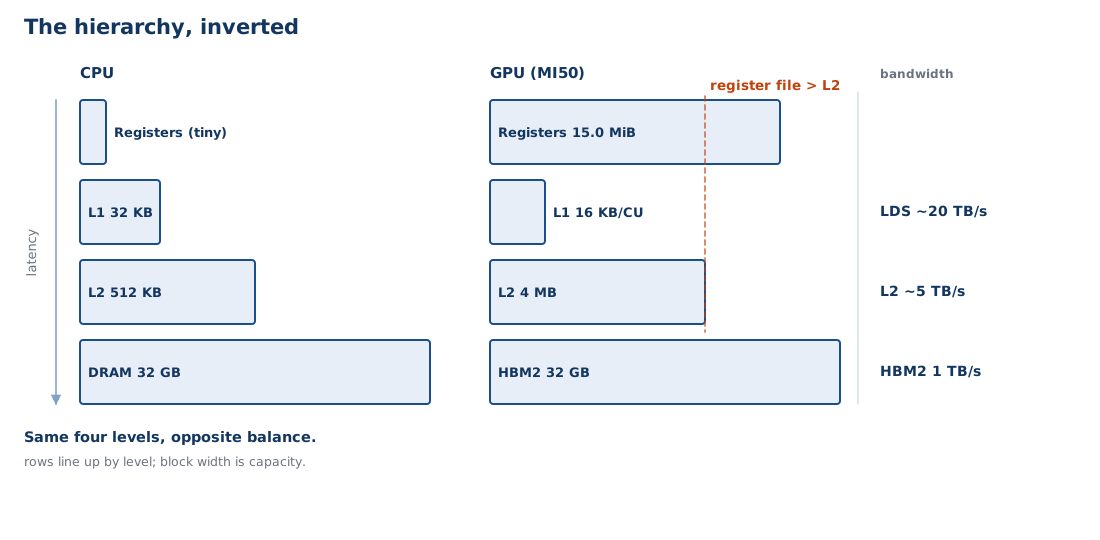
One MI50: 60 CUs × 256 KB = 15.0 MiB of register file — nearly four times its own 4 MB L2. The hierarchy has been turned inside out.

Four Attempts at a Throughput Machine

The GPU is not the first machine to make this bet. It is the first one to win it.

Lanes per issue slot Independent streams Outcome
Itanium (2001) 3-wide VLIW 1 per core lost — no parallelism to fill the width
SPARC T2 (2007) 1 (scalar) 8 per core, 2 issue slots lost — too narrow to matter
Knights Landing (2016) 32 (2 × AVX-512) 4 per core lost — a compromise on every axis
GPU (2006–) 16–32 10 per scheduler won

Itanium had width and no threads. T2 had threads and no width. KNL had both — plus out-of-order execution and x86 compatibility — and still lost.

So it is not “more mechanisms wins”. KNL hedged on every axis and was best at none. The GPU dropped out-of-order and dropped compatibility, and spent everything on width and depth.

The Arithmetic of Hiding

DRAM on a GPU takes roughly 500 cycles. A thread has about 4 cycles of independent work before it needs the load.

Work per thread Threads needed to cover 500 cycles
4 cycles 125
8 cycles 63
16 cycles 32
32 cycles 16

A CPU answers this with caches — so the latency is usually nowhere near 500 cycles — plus an out-of-order window that finds a few tens of cycles of work inside one thread. A GPU answers it by having 125 threads.

Little’s Law

concurrency = latency × throughput

Equivalently, the number of threads you must keep resident to cover a stall:

threads = latency ÷ work-per-thread
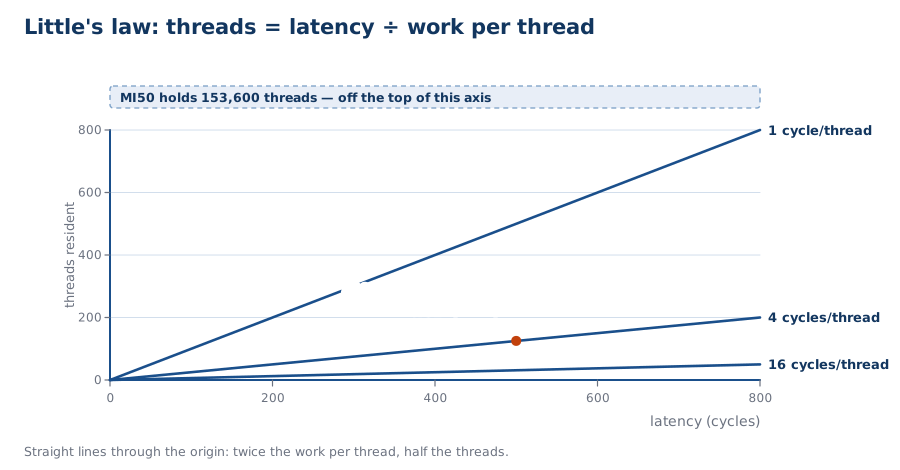
This is the deck’s one equation, the way AMAT was the memory deck’s. It is also the equation that sizes an outstanding-miss buffer, a DMA descriptor ring, and a PCIe pipeline — you will meet it again in Part V.

Archaeology: Tera MTA

Tera Computer Company, 1998. The purest thread-depth machine ever built.

Tera MTA
Thread contexts per processor 128, each with its own register set
Thread switch every cycle; blocked threads are skipped
Data caches none in the processor
Memory “full/empty” bits on every word — sync in hardware
First system 4 processors, 512 threads, gallium arsenide, at SDSC

Little’s Law, taken to its conclusion and built. A GPU would recognise this machine immediately: it is the same argument, a decade before it won, in a CPU.

One CU Is Not One Core

CPU core (Zen 5) GPU CU (Vega 20)
Arithmetic width 4–6 ALUs 64 lanes
Registers ~1–2 KB architectural 256 KB
Scheduler 1 out-of-order 4 in-order
Local storage 32–64 KB L1, then L2 16 KB L1 + 64 KB software-managed
Resident threads 2 2,560 (40 wavefronts × 64)

A CU is not a fat core. It is 16 cores’ worth of lanes with a completely different latency strategy bolted on.

Archaeology: The Connection Machine

Thinking Machines CM-2, 1987. The width axis taken to its conclusion.

CM-2
Processors 65,536, one bit each
Interconnect hypercube
Branches none — no per-processor control flow at all
Communication “news” — routing between processors
Floating point optional Weitek FPU, one per 32 processors

A one-bit ALU is the most complete possible statement of “spend everything on width”. And it is also why the machine could not survive: real data is not uniformly shaped.

What We Bought

One MI50 against the CPU it shares a box with — same machine, adjacent years:

EPYC 7642 (48 cores) one MI50 (60 CU)
Clock 2.3 GHz base 1.725 GHz
FP32 peak 48 × 32 × 2.3 = 3.5 TFLOPS 13.3 TFLOPS
Memory bandwidth 205 GB/s 1,024 GB/s
Power 225 W 300 W
FP32 per watt 15.6 GFLOPS/W 44 GFLOPS/W

~4× the FLOPs and ~5× the bandwidth — and nearly 3× better per watt. Kraken’s four cards together are ~15× its CPU.

What We Paid

  • Single-thread performance is bad. No speculation, no out-of-order, narrow scalar path. For one thread, a GPU is far slower than the CPU next to it.
  • Every access must be shaped. A warp that touches 64 scattered addresses costs 64 transactions.
  • The programmer must expose the parallelism. The hardware will not find it.
  • Divergence is expensive. Two paths through an if cost the sum, not the max.

The CPU hides latency from the programmer. The GPU makes the programmer responsible for it. That trade is the entire programming model, and it is why Lecture 3 exists.

Part II — SIMT

The Program

One million floats. Add two vectors:

for (int i = 0; i < n; i++)
    c[i] = a[i] + b[i];

The loop is not the problem. With three or more ALUs and out-of-order issue, the compare, the increment and the branch fold into the same cycles as the body — i++ is free.

The problem is width. Fully vectorised with AVX-512, this does 16 elements per iteration. On an MI50 we want 3,840 lanes. That is a 240× gap that no amount of unrolling closes.

One PC per Lane Doesn’t Scale

The obvious design: every thread is a real thread, with its own program counter, scheduled independently — a CPU core replicated 153,600 times.

Threads resident 153,600
Instruction fetches per cycle one per thread
Decode width needed 153,600

A core can issue a handful of instructions per cycle, not 153,600. Independent threads would need independent fetches — and the fetch unit, not the arithmetic, becomes the bottleneck.

One PC per Wavefront

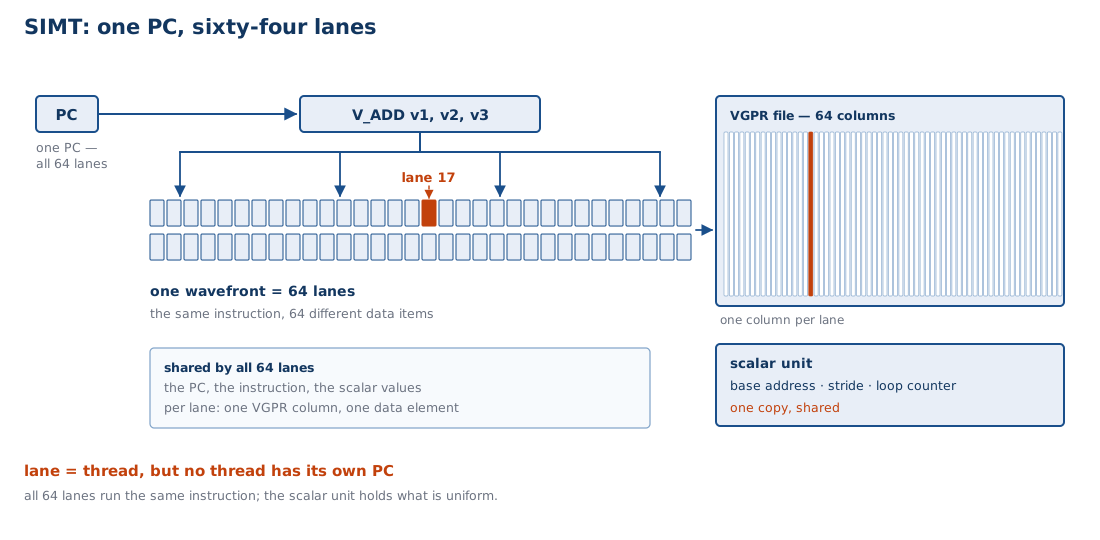
Sixty-four lanes share one program counter. One fetch, one decode, one issue — 64 lanes wide.

  • A wavefront is the 64 lanes that move together. (NVIDIA calls it a warp and makes it 32; RDNA can do either.)
  • Every lane has its own registers, and executes the same instruction on different data.
  • An exec mask says which lanes are currently active.

This is SIMT — single instruction, multiple threads. The instruction stream is shared; the state is not. That is the trick that makes 3,840 lanes affordable.

The Register File, Drawn

Every lane needs its own registers, because every lane is working on a different element.

  • Vector registers (VGPRs): 64 columns, one per lane. This is where the 256 KB per CU goes.
  • Scalar registers (SGPRs): one copy, shared by the whole wavefront. Holds the things that are the same for all 64 lanes — the base address, the stride, the loop counter.

That split is the architecture. The compiler’s job is to keep as much as possible in scalar registers, because a scalar value costs 1/64th of a vector value.

Divergence

Now put a branch in the loop:
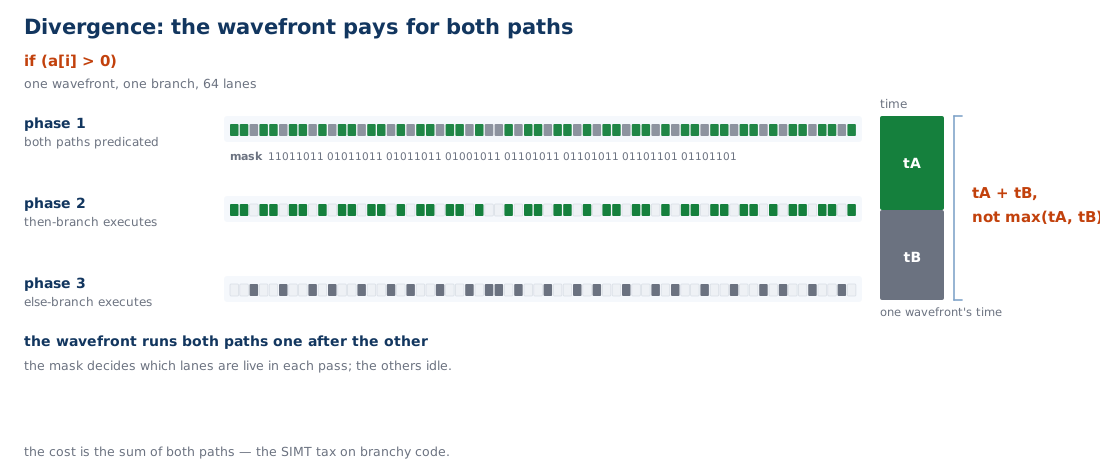
for (int i = 0; i < n; i++)
    c[i] = (a[i] > 0) ? a[i] : -a[i];

The 64 lanes do not agree. Some want the then path, some the else. The hardware cannot run both at once, so it runs one path with the mask on, then the other with the mask off.

What Divergence Costs

Cost
CPU mispredicted branch flush the pipeline — ~15 cycles, once
GPU divergent branch run both paths — tA + tB, not max(tA, tB)

A 64-way switch on a data-dependent value can serialise a wavefront 64×.

So the GPU trades a rare, bounded penalty (misprediction) for a common, unbounded one (divergence). That is the price of not having a predictor.

Archaeology: The Goodyear MPP

Massively Parallel Processor, 1983. Built for NASA Goddard to process Landsat satellite imagery.

MPP
Processing elements 16,384, one bit each
Shape 128 × 128 array
Workload satellite images
Clock 10 MHz
Control flow none per element

This is a GPU doing a GPU’s job — forty years early. The demand for a throughput machine did not appear in 2006; it appeared as soon as there were more pixels than a CPU could chew.

SIMT vs Vectors

The C906 on our own boards has RVV vector instructions. A GPU has SIMT. They look similar and are not the same.

Vector (RVV) SIMT
One instruction, N lanes yes yes
One PC yes yes
Programmer sees the lanes yes — vl, vsetvl no — each lane looks scalar
Per-lane registers shared vector registers private VGPRs
Divergence explicit masks, programmer’s job automatic, hidden, costly

A vector unit is one thread doing N things. SIMT is N threads that happen to move together. The code you write for each looks completely different.

What We Bought, What We Paid

Bought

  • Scalar-looking source code that runs 64 lanes wide.
  • No vector types, no vsetvl, no manual widening.
  • The same program scales from a laptop iGPU to a server card by changing the block count.

Paid

  • Divergence — data-dependent control flow serialises.
  • You must think in wavefronts: block sizes that are not multiples of 64 waste lanes on the last wave.
  • Debugging is by wavefront, not by thread.

SIMT is the most successful lie in computer architecture: it convinces the programmer they are writing scalar code, and then runs it 64-wide.

End of Lecture 1

What we established:

  1. The bet. A GPU spends its area on concurrency instead of latency.
  2. Little’s Law. Threads = latency ÷ work. That is the whole design — and it is why thread depth matters more than SIMD width.
  3. SIMT. 64 lanes share one PC; divergence is the price of not having a predictor.
  4. Four attempts, one winner. Itanium, T2 and Knights Landing each got one axis right. The GPU got both, and promised nobody compatibility.
  5. The workload decides. Graphics supplied the parallelism for free.

Lecture 2 asks the obvious next question: fine — so how do you actually build one of these? From a single compute unit to a whole card.

Part III — Memory, Inverted

The Hierarchy, Inverted

Level CPU (Zen 5) GPU (MI50)
Registers ~2 KB arch. 15.0 MiB
L1 32–48 KB 16 KB × 60 CUs = 960 KB
L2 1 MB 4 MB
Last level DRAM HBM2, 32 GB

The register file is nearly four times the L2. On a CPU, registers are a rounding error next to the caches. On a GPU they are the largest structure in the core.

Expose or Hide?

The memory deck asked this question about the hierarchy and answered hide — a cache decides what to keep, in hardware, invisibly.

The GPU answers expose.

Cache Scratchpad
Who decides what is resident hardware software
Policy LRU, FIFO, random whatever the programmer wrote
Predictability statistical exact
Size on MI50 16 KB L1 64 KB LDS per CU

With 40 wavefronts competing, a hardware policy thrashes. Staging explicitly is slower to write and faster to run — and, crucially, predictable.

Archaeology: Cell

Sony/Toshiba/IBM, 2005. “Expose” taken to its limit — and shipped in a games console.

Cell BE
Cores 1 PowerPC PPE + 8 SPEs
Per SPE 256 KB local store, no cache
Data movement explicit DMA in and out
SIMD width 128-bit

Every load and store is a DMA you wrote yourself. This is the LDS argument from the previous slide, with the cache deleted rather than demoted.

The Third Tier: GTT

A CPU has DRAM. A GPU has DRAM and a way to make system memory look like its own.

  • The GPU has its own page tables — its own MMU, independent of the CPU’s.
  • So the driver can map system pages into the GPU’s address space.
  • That mapping is the GTT (graphics translation table).

On a discrete card the GTT path crosses PCIe. That makes it the spill path — the place data goes when it does not fit in VRAM, at a fraction of the bandwidth.

On an APU there is no bus between the two page-table hierarchies. The GTT path is the same fabric, so it is free.

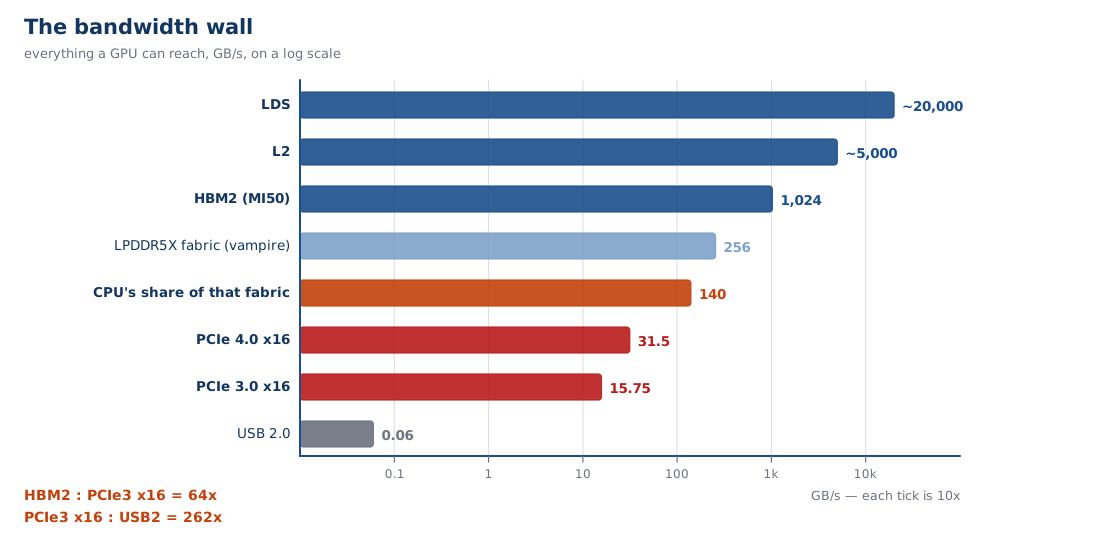
The Bandwidth Ladder

Boundary Width
Shared memory → lanes ~13,000 GB/s
L2 → CU ~5,000 GB/s
HBM2 → L2 1,024 GB/s
LPDDR5X fabric (vampire) 256 GB/s spec
CPU’s share of that fabric ~140 GB/s measured
PCIe 4.0 x16 31.5 GB/s
PCIe 3.0 x16 15.75 GB/s
USB 2.0 0.06 GB/s

Every bandwidth number in Lecture 2 is one of these rows. The ~33× between HBM2 and PCIe is the most important one, and Part V is about where it comes from.

Coalescing

A wavefront issues one load instruction. Sixty-four lanes each want 4 bytes. What addresses do they want?
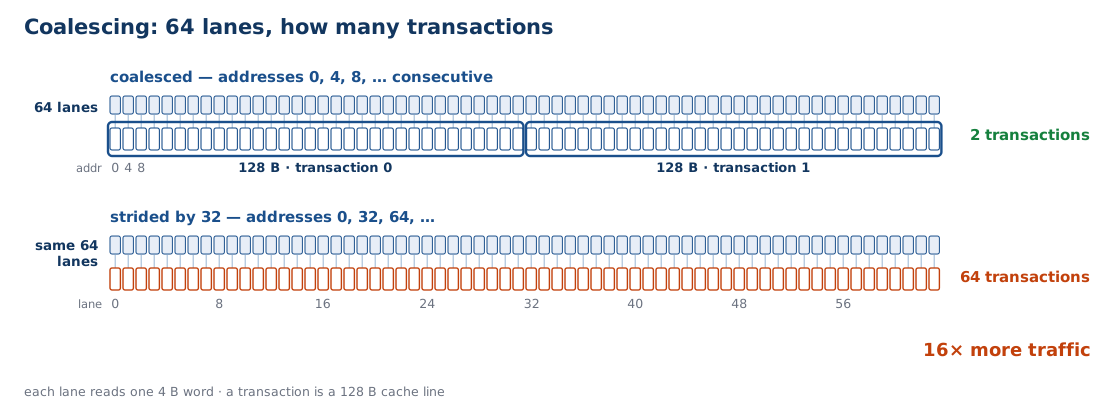
Pattern Transactions Efficiency
64 consecutive floats 2 × 128 B 100%
stride 32 floats 64 × 64 B 6.25%

The hardware coalesces the 64 lane addresses into as few cache-line transactions as it can. Consecutive is perfect; strided is catastrophic.

Why Coalescing Is Block Size

In the cache deck, block size was a tradeoff: bigger blocks exploit spatial locality, and cost you on a miss.

On a GPU, the wavefront is the block.

CPU cache GPU wavefront
Unit of access cache line (64 B) 64 lanes × their element
Decided by hardware, fixed the code the programmer wrote
Mispredict costs one wasted line 64 wasted transactions

The block-size decision did not disappear. It moved from the cache designer to the programmer — and it is now made by how you lay out your data.

Occupancy

How many wavefronts can a CU hold? It is a division problem.
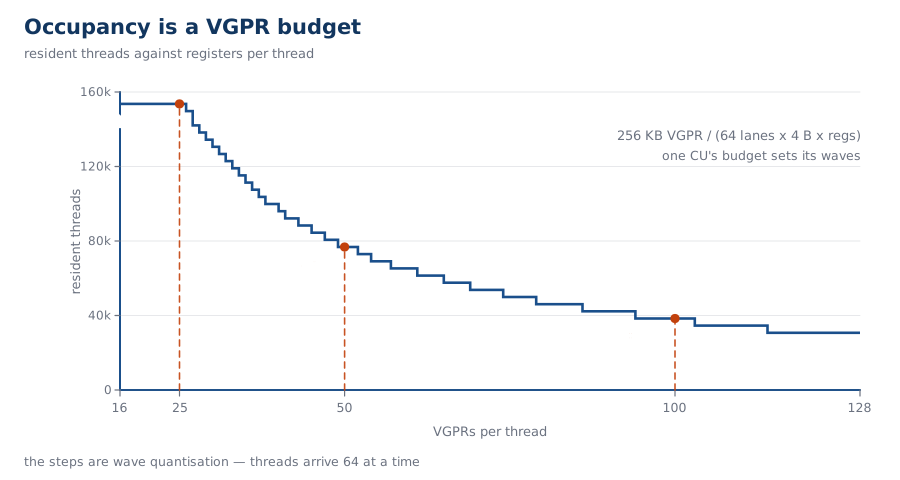
256 KB of VGPR ÷ (64 lanes × 4 B × registers-per-thread)

Registers per thread Resident wavefronts Resident threads
25 40 153,600
50 20 76,800
100 10 38,400

Every register you spend on one thread is a thread you cannot hold. That is the GPU’s version of AMAT — one equation that every optimisation moves.

Half the Memory Is Not for the CPU

vampire has a 256 GB/s memory interface. The multicore notes already called this machine “really weird — quad channel DDR5, but only for the integrated graphics.” Let us put a number on it.
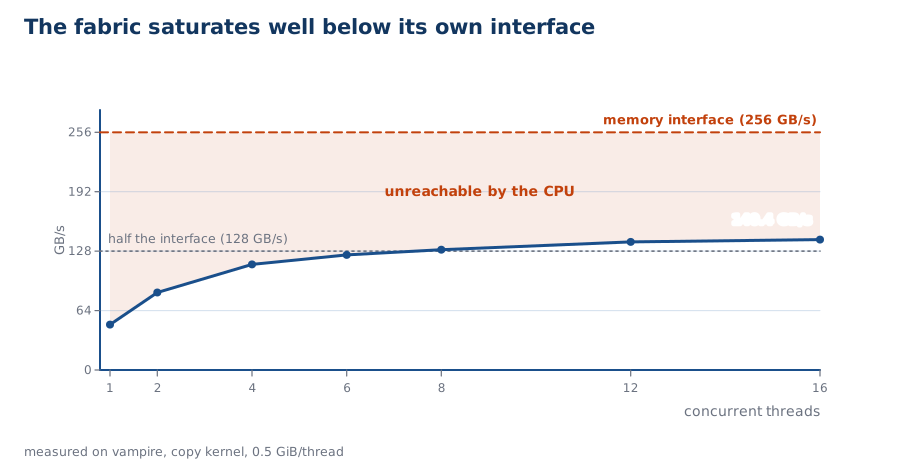
Threads 1 2 4 8 16
GB/s 48.9 83.5 113.7 129.6 140.4

The CPU saturates at ~140 GB/s — about 55% of the interface — and stops.

Two stories fit: the CPU gets half the channels, or its fabric link to the memory controller is narrower than the controller. 140 against 128 is within 10%, so this measurement does not separate them.

Unified Memory: When the Bus Isn’t There
On vampire:

Physical LPDDR5X ~128 GiB
Carved out as VRAM 16 GiB
Visible to Linux 109.7 GiB
GTT aperture 104 GiB

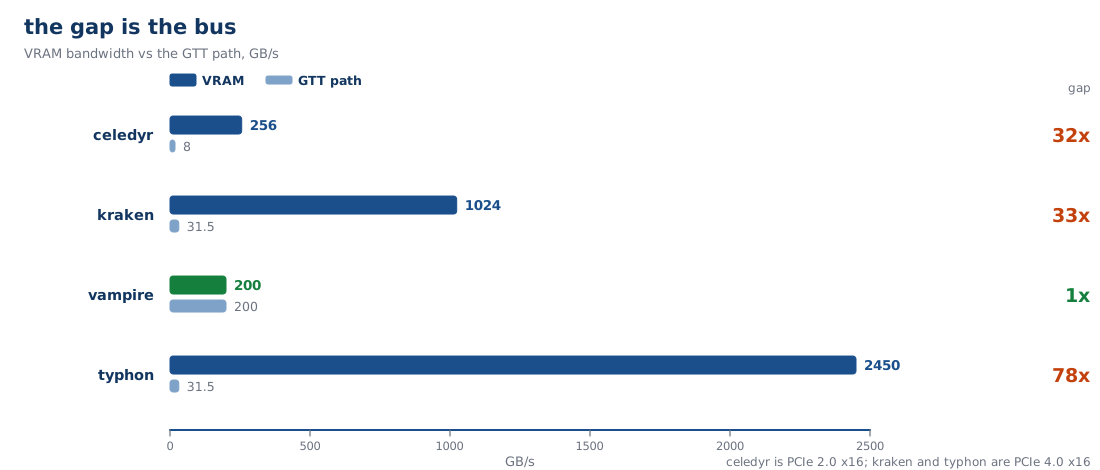
So the GPU can address about 120 GiB, and allocating ~100 GiB at runtime is routine. On celedyr you can spill 100 GiB into GTT — the transfer itself is only seconds. What kills it is that every later touch of that data crosses the bus at 1/32nd of local bandwidth.

Part IV — The Machine

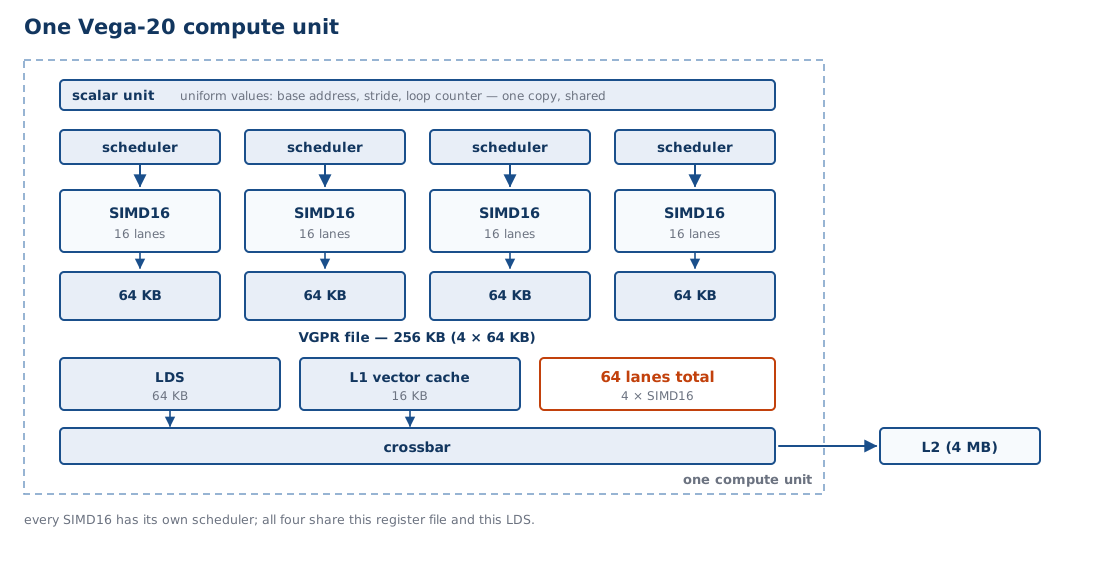
Build Up: One Compute Unit

Part Vega 20 CU
Lanes 4 × SIMD16 = 64
Schedulers 4, one per SIMD
Vector registers 256 KB (4 × 64 KB)
Shared memory 64 KB LDS
L1 vector cache 16 KB
Wavefronts resident up to 40 (10 per SIMD)

Four independent schedulers is the key number: each picks a wavefront every cycle, so the CU can issue from four different places at once.

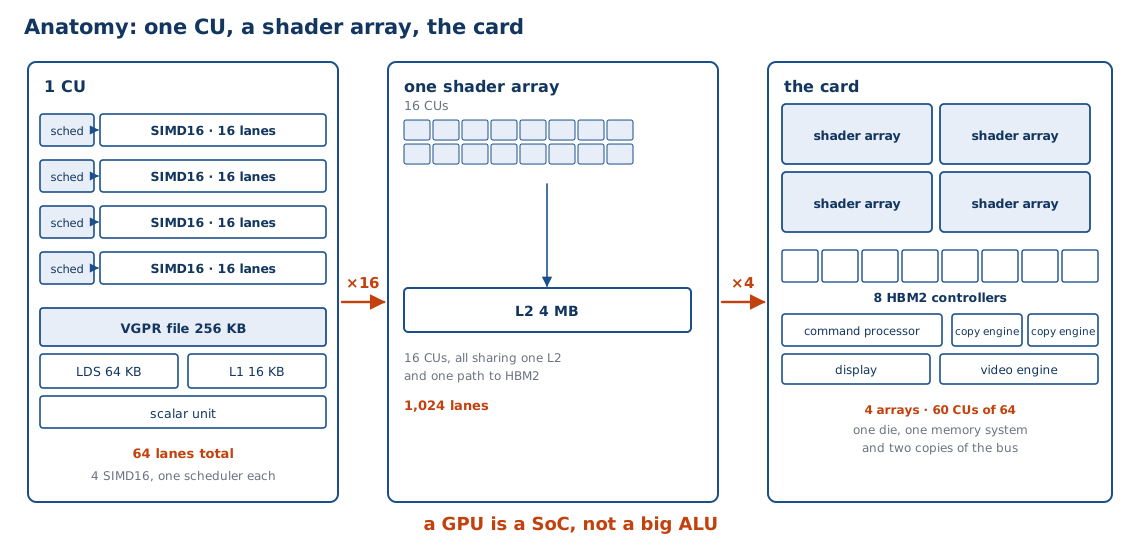
Build Up: The Shader Array

Sixteen CUs, wired together — and then four of those arrays make a GPU:

One shader array The whole GPU (MI50)
Compute units 16 4 arrays, 60 of 64 enabled
Lanes 1,024 3,840
L2 shared by all four arrays 4 MB
Interconnect crossbar crossbar
HBM2 via the memory controllers 4 stacks, 8 controllers

Now the Part III numbers have somewhere to live: 60 CUs × 256 KB is the 15.0 MiB register file, and 60 × 64 KB is 3.75 MiB of LDS — nearly as much as the L2.

Build Up: The Whole Card

A GPU is not a big arithmetic unit. It is a computer:

Block Job
Shader array the 60 CUs
Memory controllers 8 × HBM2
Command processor takes work from the host
Copy engines (2) DMA between VRAM and system memory
Display (DCN) scanout to the monitor
Video (VCN) H.264/H.265 encode and decode

Only one of those six blocks does the arithmetic we have spent three parts building up to. The rest is a system on a chip.

A GPU Is a SoC

You have met this pattern before. The sg2000 is 2 × C906 + A53 + 8051 plus a pile of engines. A GPU is the same shape with a much larger shader array.

sg2000 engine GPU equivalent Job
TPU shader array the arithmetic
VPU (H.264/H.265) VCN video codec
JPEG JPEG still image
SDMA copy engines data movement
display/VPSS DCN scanout, scaling

The engine zoo is the normal shape of a modern chip. What makes a GPU a GPU is that its “engine” is programmable.

Archaeology: GreenArrays

GA144, 2011. The one design point with no clock tree at all.

GA144
Cores 144, each an independent asynchronous computer
Clock none — each node runs when a neighbour gives it work
Effective rate ~700 MHz per node — 1.4 ns per basic opcode at 1.8 V
Aggregate 144 nodes ≈ 96 GOPS at full activity
Per node 18-bit stack machine, 64 words RAM + 64 words ROM
Power 14 µW to 650 mW, depending on activity
Language arrayForth

Compare the sg2000: one 25 MHz crystal, eight PLLs, ninety leaf clocks, ~3 W. GreenArrays deleted the tree — and an idle node costs only leakage, because nothing is clocking it.

The Command Processor

How does the CPU tell the GPU to do something? Not by calling a function.

  1. The driver builds a command buffer in memory: draw calls, dispatches, buffer addresses, all as packets.
  2. It writes the buffer’s address into a ring buffer the GPU is watching.
  3. It writes a doorbell — a single MMIO store that says “there is new work”.
  4. The GPU’s command processor reads the packets and dispatches them.
  5. A fence (a memory write the GPU performs) tells the CPU the work is done.

Notice: the CPU never touches the data. It writes a description of the work, rings a bell, and the GPU’s own DMA engines move the bytes.

The GPU’s Own MCU

A GPU has a small computer inside it whose only job is to manage the big one:

  • RLC — runs the scheduler, handles preemption, manages power states.
  • MEC/ME — the microcode engines that dispatch wavefronts to CUs.
  • It handles the doorbell, and it keeps running when the shader array is idle.

This is the sg2000’s always-on island pattern again: a tiny, always-powered microcontroller that supervises the part that costs real power.

Seven Machines, Seven Answers

Machine Accelerator Attach Memory Bandwidth
sg2000 none (TPU/VPU/ISP) on-die carveouts of 512 MB 3.73 GB/s
celedyr Polaris 10 · 2016 PCIe slot 4 GiB GDDR5 ~256 GB/s
kraken 4 × Vega 20 · 2018 4 PCIe slots 32 GiB HBM2 each 1,024 GB/s
typhon 8 × Gaudi2 · 2022 2 sockets × 2 switches 96 GiB HBM2e each 2,450 GB/s
unicorn RX 7600 · 2023 PCIe slot 8 GiB GDDR6 ~288 GB/s
vampire Radeon 8060S · 2025 on-die, still a PCIe endpoint 16 GiB + 104 GiB GTT ~200 GB/s
pegasus Arc Battlemage · 2025 PCIe slot 32 GiB n/m

Nine years separate celedyr from pegasus, and the attach column barely changed: on-die, or a slot. What changed is the memory behind the BAR — and how much of it you are allowed to see.

Why the iGPU Is Still a PCI Device

On vampire, the integrated GPU — no slot, no cable, same die as the CPU — appears in lspci as:

be:00.0 Display controller: AMD/ATI Device 1586
    Region 0: Memory at 8000000000 (64-bit, prefetchable) [size=16G]
    Kernel driver in use: amdgpu

Because PCI configuration space is the only standard way an operating system discovers a device and maps its registers. Integration changes the physics, not the protocol.

End of Lecture 2

What we established:

  1. The hierarchy is inverted. Registers above L2, and the programmer manages the middle.
  2. GTT is the tier a CPU does not have. GPU page tables can point at system memory — which is unified memory, and which is free only when there is no bus in between.
  3. Occupancy is the AMAT. 256 KB ÷ (64 × 4 × regs). Every optimisation moves that one number.
  4. A GPU is a SoC, and the shader array is one block of six.
  5. The command processor is the interface. Doorbell, packets, fence — the CPU never touches the data.

Lecture 3 starts with a question this lecture raised: if the iGPU is on the same die as the memory controller, why does it still need a bus address — and what does a real bus cost when there is one?

Part V — PCI and PCIe

Why a Bus at All

The sg2000 has no bus. Every peripheral is on the die, memory-mapped, and described to the kernel by the device tree:

uart0: serial@04140000 { compatible = "snps,dw-apb-uart"; reg = <0x0 0x04140000 ...>; };

That works beautifully — until the thing you want to attach is too big to be on the die.

Die area
SG2000 (4 cores + engines) small, and it is a ~3 W part
One MI50 GPU 331 mm² of shader array, plus 4 HBM2 stacks

So the GPU must be off-chip. And the moment a device is off-chip, you need two things you did not need before: a physical link, and a way to find it.

PCI, 1992

The Peripheral Component Interconnect — a shared parallel bus, and the same shape as two buses you already know.

I²C SPI PCI
Wires 2 3 + n CS ~50–100
Clock 100 k–3.4 M 10–100 M 33 / 66 MHz
Bandwidth ~50 KB/s (400 kHz) ~6 MB/s (50 MHz) 133 MB/s
Addressing 7-bit, in-band chip-select wire memory-mapped
Arbitration open-drain collision none central arbiter

Same three problems — who is this for, who gets to talk, how fast — and three different answers. PCI’s answer to speed is width: 32 wires switching together, not one wire switching faster.

PCI’s Two Good Ideas

PCI died. Two of its ideas did not, and they are why we are still living with its successor.

On I²C you read a register: send the address, then the register number, then bytes. The device’s state lives inside the device, at addresses the device defines.

PCI inverts that. A device is given a range of the CPU’s own address space, and the CPU loads and stores into it like memory.

1. Configuration space. Every device has 256 bytes of standard registers holding its vendor ID, device ID, class, and — crucially — its BARs. The OS can walk the bus and find out what is there.

2. Base Address Registers. A device says “I need N bytes of address space”. The OS assigns it an address. The device’s registers then appear in the CPU’s physical address map.

That is enumeration — the exact opposite of a device tree. The device announces itself; the OS does not need to be told in advance.

PCIe, 2003

PCI Express throws out the shared bus and keeps the two good ideas.

PCIe
Topology point-to-point — every device has its own link
Signalling serial, lanes (1, 2, 4, 8, 16)
Duplex full — transmit and receive simultaneously
Unit of transfer packets (TLPs), not bus cycles
Hierarchy root complex → switches → endpoints

Because links are point-to-point, you can build a tree. Because you can build a tree, you can put eight accelerators in one box without them fighting over wires.

Lanes and Generations

A lane is one serial link. You buy width by buying lanes.

Generation Per lane ×4 ×16
PCIe 1.0 (2003) 250 MB/s 1 GB/s 4 GB/s
PCIe 2.0 (2007) 500 MB/s 2 GB/s 8 GB/s
PCIe 3.0 (2010) ~1 GB/s ~4 GB/s 15.75 GB/s
PCIe 4.0 (2017) ~2 GB/s ~8 GB/s 31.5 GB/s
PCIe 5.0 (2019) ~4 GB/s ~16 GB/s 63 GB/s

Put the ×16 column next to the Part III ladder: even PCIe 5.0 is 16× slower than the HBM2 on the card it is feeding. The bus was never going to keep up.

What a BAR Actually Is

A Base Address Register is how a device gets a window into the CPU’s physical address space.

  1. The device says: “I need 256 MiB.”
  2. The OS assigns it an address — say 0xd0000000.
  3. Now a CPU store to 0xd0000000 is a packet sent over PCIe to the device.

The BAR is not a copy of the device’s memory. It is a window — an address range that, when touched, generates bus traffic instead of hitting DRAM.

The BAR Is a Policy, Not a Generation
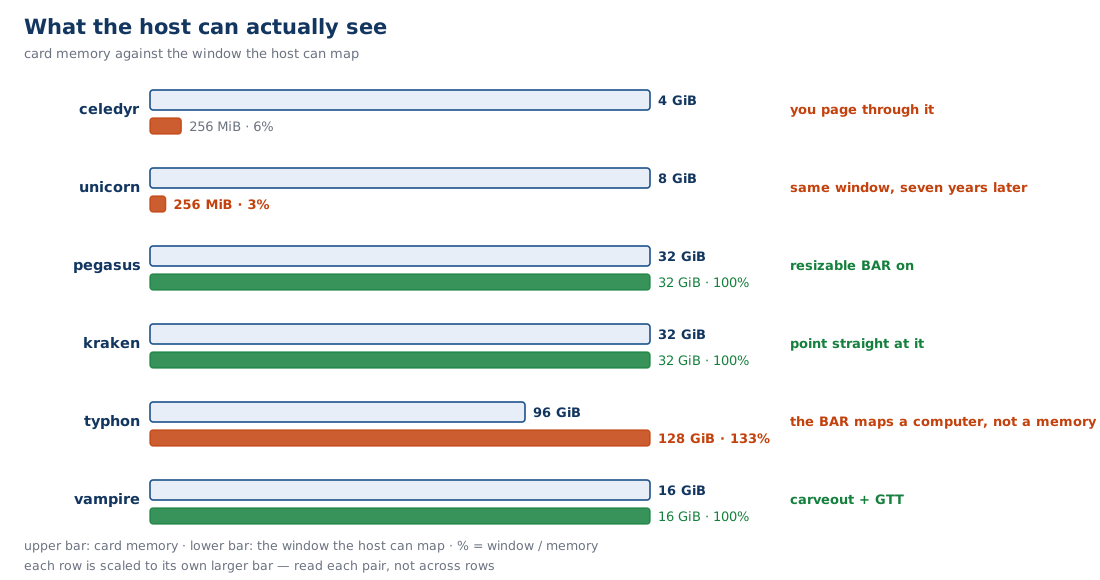
Machine Card Year Memory BAR window Visible
celedyr Polaris 10 2016 4 GiB 256 MiB 6%
unicorn RX 7600 2023 8 GiB 256 MiB 3%
pegasus Arc Battlemage 2025 32 GiB 32 GiB 100%
kraken MI50 2018 32 GiB 32 GiB 100%
typhon Gaudi2 2022 96 GiB 128 GiB 133%
vampire iGPU 2025 16 GiB carveout 16 GiB 100%

Look at the first two rows. A 2023 card ships with the same 256 MiB window as a 2016 one — and because its memory doubled, the fraction you can see halved. The window is a firmware setting, not a generation of the bus.

Topology on Our Machines
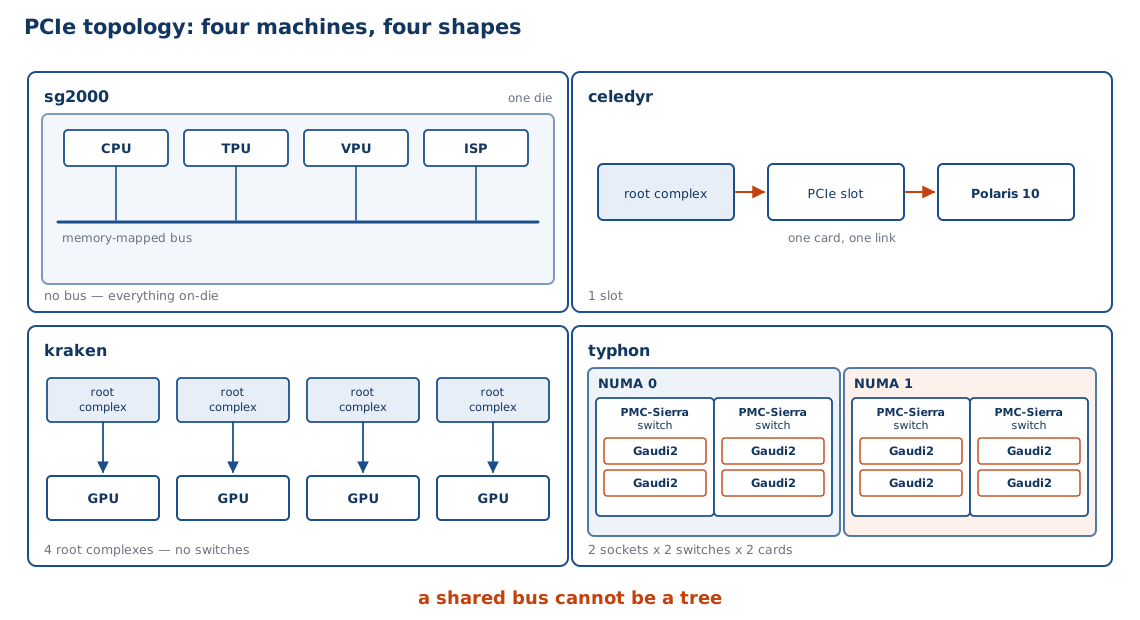
Read the four panels left to right as a progression: no bus, one link, four links, a switch tree. Each step is a design decision PCIe made possible and PCI could not.

Why a Switch Needs PCIe

typhon has eight accelerators, and they are not all on separate links:

socket 0 ── root complex ── PCIe switch ─┬── Gaudi2
                                          └── Gaudi2
         └─ root complex ── PCIe switch ─┬── Gaudi2
                                          └── Gaudi2
socket 1 ── (same, four more cards)

A switch forwards packets by address, exactly like a network switch. You cannot build this out of a shared bus — a broadcast medium has no notion of “this packet is for that device”.

NUMA Is a PCIe Topology

The multicore lecture ended with an open question: “Intel tries for less NUMA nodes — ssh into typhon, can we figure this one out?”

Here is the answer.

CPU 2 × Xeon Gold 6338N, 32 cores each
NUMA nodes 2 (not 4 — Intel’s answer to EPYC’s four)
Cards 0–3 NUMA node 0
Cards 4–7 NUMA node 1
Distance between nodes 20 (vs 10 local)

So NUMA is not only about memory locality. It is about which root complex your accelerator is behind — and a GPU on the far node pays double.

DMA over PCIe

The command-processor pattern from Part IV, now with a bus underneath it.

Method What the CPU does Cost
Programmed I/O copies every word a bus round trip per word
Interrupt-driven copies every word, sleeps between still a round trip per word
DMA writes a descriptor, rings a bell one round trip per transfer

The copy engines do the moving. The CPU writes maybe 32 bytes of descriptor and then goes away — which is the only way to use a link whose latency is measured in hundreds of nanoseconds.

Coherency Is Not Provided

PCIe moves data. It does not keep the CPU’s caches in sync with it.

  • The CPU’s caches do not snoop PCIe writes.
  • If a device DMAs into a buffer the CPU has cached, the CPU may read stale data — or its dirty lines may overwrite the device’s work.
  • PCIe has optional extensions (ATS, PRI) that help, and they are not free and not universal.

So the driver does it by hand: invalidate before the device writes, flush before the device reads. Every DMA driver you have ever read is doing this.

The Bandwidth Wall

HBM2 on the card 1,024 GB/s
PCIe 4.0 ×16 to the card 31.5 GB/s
Ratio 33×

That is the kraken number from Part III: the VRAM-versus-GTT gap on that machine is 33×. Not a coincidence — it is the same link.

And the ratio barely moves between generations. celedyr is a 2016 card in a PCIe 2.0 slot; kraken is a 2018 card in a PCIe 4.0 slot — 8 GB/s against 31.5. Both come out at 32–33×, because on-card bandwidth and link bandwidth grew in step.

So the programming model is forced:

  • Batch work, so one crossing amortises over many operations.
  • Keep data resident, so you cross as rarely as possible.
  • Never round-trip per element. Ever.

The sg2000 Counterfactual

We can check whether the sg2000 has PCIe directly. The TRM is 75,894 lines of text:

Search Hits
pcie, pci express, serdes, root complex 0
gpu, opengl, shader 0

And its fastest off-chip link:

Link Bandwidth
USB 2.0 high speed 60 MB/s
10/100 Ethernet 12.5 MB/s
One PCIe 4.0 ×16 slot 31,500 MB/s

The sg2000’s best external link is 525× short of a single PCIe slot. There is no bus to put a GPU on — which is exactly why its accelerator is the on-die TPU instead.

What If It Did?

Suppose we bolt a PCIe root complex onto the sg2000. Five things break:

  1. Discovery. A GPU would need no device-tree node — the kernel would enumerate it. The DT would shrink.
  2. Address space. A 16 GiB BAR does not fit a 4 GB physical map. You would need a paging window — exactly celedyr’s 256 MiB.
  3. Coherency. The C906’s caches are not coherent with a PCIe device — and the on-die DMA you already have is not coherent either. PCIe makes it worse: the device now sits behind a non-coherent link, with an IOMMU in between.
  4. Power and pins. A PCIe PHY and SerDes on a ~3 W part, plus board area and a connector.
  5. Amdahl. A 1 GHz dual-issue C906 could not feed a GPU anyway. The accelerator would starve.

Each one is solvable. Together they describe a different chip — which is the point: these are not features, they are a design point.

Three Design Points

Integrate Expand Network the accelerator
Example sg2000 celedyr, kraken typhon (8 × Gaudi2)
Bus none PCIe PCIe plus 48 MACs of Ethernet per card (two per port)
Wins cost, power, latency flexibility, scale scale-out bandwidth
Loses no expansion the wall complexity, cost

Gaudi2 is the most interesting column: its designers looked at the wall and concluded that for training, the host link does not matter — so they built the interconnect between accelerators instead. NVIDIA’s answer to the same wall is NVLink. Both are saying the same thing: PCIe is not where the data goes.

Part VI — Programming

The Rewrite

The multicore lecture said: multi-core support required a rewrite, and the structure of that rewrite has only recently become clear.

The GPU rewrite is larger.

Multicore rewrite GPU rewrite
Parallel units 2–24 thousands
You must find independent work thousands of independent operations
Locks avoid contention atomics, not blocking locks
Memory keep the working set local shape every access
Failure mode slow up to 64× slow

Multicore asked you to stop serialising. A GPU asks you to expose parallelism the CPU would have hidden from you — and to do it in the shape the hardware wants.

Grids, Blocks, Wavefronts

One million floats, again. This time we say how to lay them out.

Concept Size For 1M elements
Grid all the work 1,024 blocks
Block threads per block 256 threads
Wavefront 64 lanes 4 wavefronts per block
Thread one element 1 element each
// one thread's entire job
int i = blockIdx.x * blockDim.x + threadIdx.x;
if (i < n) c[i] = a[i] + b[i];

The if (i < n) is doing real work: a million elements is not a multiple of 1,024 × 256, so the last wave has lanes with nothing to do.

The Two Failure Modes

Failure Symptom Cost
Divergence data-dependent branches up to 64×
Uncoalesced access strided or scattered addresses up to 16×
(and a third) too few threads resident latency exposed

Both of the big two are memory-and-control-shape problems, not arithmetic problems. That is the recurring lesson: a GPU is easy to compute on and hard to feed.

Occupancy vs Registers

The Part III equation is a tuning dial, and it is one the compiler turns for you unless you stop it.

Registers per thread Wavefronts per CU Latency hidden
25 40 a lot
50 20 some
100 10 barely any
255 (max) 4 none

Fewer registers means more threads means more hiding — but fewer registers also means the compiler spills to memory, which is the thing you were hiding. The dial has a bad end in both directions.

Data Movement Dominates

Take the vector add from Part II and actually run it.

Step Bytes Time
Move a, b to VRAM; c back 12 MB 381 µs at 31.5 GB/s
The add itself 12 MB 12 µs at 1 TB/s

97% of the runtime is the bus. The arithmetic — the thing we spent three parts building a machine for — is a rounding error.

This is why real GPU programs are written to do thousands of operations per byte moved, and why “the kernel is fast” and “the program is fast” are different claims.

GPU vs TPU vs HPU

Three points on the specialisation spectrum, all on machines you can ssh into.

TPU (sg2000) GPU (MI50) HPU (Gaudi2)
Programmable no — fixed function yes yes, for training
Peak 0.5 TOPS INT8 13.3 TFLOPS FP32 —
Memory shared with CPU 32 GiB HBM2 96 GiB HBM2e
Attach on-die, no bus PCIe PCIe + 48 MACs (two per port)
Power a few watts 300 W 600 W
Wins when the op is fixed the op varies the cluster matters

Specialisation is a spectrum, not a binary. Where a chip sits is set by what it must move, not by what it must compute.

Part VII — Synthesis

Archaeology: Itanium’s Revenge

Groq TSP, 2020. The bet that failed in 2001 — now shipping.

Itanium (2001) Groq TSP (2020)
Scheduling static, compiler static, compiler
Out-of-order none none
Caches (present, but not the point) none — 220 MiB of SRAM instead
Why it failed/works couldn’t find the parallelism inference: the schedule is knowable

Itanium lost because the compiler could not predict a cache miss. A neural net’s shape is known at compile time — so the schedule really is static, and the bet that looked naive in 2001 looks obvious now.

What We Actually Learned

  1. The bet. A GPU spends its area on concurrency, not latency. Everything else follows.
  2. Little’s Law. threads = latency ÷ work. It sizes a register file, a miss buffer, and a DMA ring.
  3. SIMT. 64 lanes share a PC; divergence is the price of not having a predictor.
  4. The hierarchy is inverted, and it is exposed. Registers above L2; LDS above cache; the programmer manages the middle.
  5. Every boundary is a fabric. The narrowest one you must cross sets your performance — and on our machines that ranges from 20 TB/s to 60 MB/s.
  6. The bus is the design point. PCIe’s wall is why GPUs batch, why Gaudi2 has 48 MACs, and why the sg2000 has no GPU at all.

The textbook CPU model is not wrong — it is a model of one design point. The interesting engineering is in the places where a machine chooses a different one.

Discussion Prompts

  • The CPU on vampire reaches only ~140 GB/s of a 256 GB/s interface. Is that a bug or a design decision? Argue both sides.
  • celedyr’s card has 4 GiB but only a 256 MiB window. What does the driver have to do, and when does it lose?
  • A wavefront diverges into two paths of 10 and 50 cycles. What does it cost, and what would you change in the data layout to fix it?
  • The sg2000 has no PCIe and no GPU. Add one — which of the five consequences from Part V would you give up first, and why?
  • Gaudi2 answers the wall with Ethernet; NVIDIA answers it with NVLink. What would you do if you had to attach 64 accelerators to one host?
  • Occupancy and register pressure pull in opposite directions. Design an experiment on kraken that would find the sweet spot.

Every one is answerable from this deck. None has a single right answer.

Refs

Primary sources

  • AMD Vega 20 ISA reference, MI50 datasheet — CU structure (4 × SIMD16, 256 KB VGPR, 64 KB LDS, 16 KB L1), 4 MB L2, HBM2 bandwidth.
  • AMD RDNA 3 and Strix Halo — RX 7600 on unicorn and the 8060S on vampire; values measured, not quoted.
  • Intel Battlemage and Habana Gaudi2 — pegasus via xpu-smi, typhon via hl-smi. The 24-port GbE figure is vendor spec; the 48 MACs are measured.
  • PCI-SIG base specification — configuration space, BARs, TLPs, lane widths. The generation/bandwidth table is from the spec, not measured.

Measured on our hardware

  • lspci -vv BARs · mem_info_* sysfs · hl-smi · xpu-smi · rocminfo · a twenty-line numpy copy kernel with a threading.Barrier for the fabric curve.

Companion

  • Reference Notes · ../memory-slides/ · ../pipelining-slides/ · ../power-slides/ · ../boot-slides/